Oversampling
Little Clipper 2—Cracking the Code
Wait, what? Sonic benefits of clipping? Aren’t we supposed to avoid clipping?
We’ve all been there: You’ve got your mix sounding the way you want; drums are punchy and prominent, you snare has power and punch, but then you look at the track overload meters in the red and think you need to pull levels down to prevent all the clipping (which you didn’t hear). So you start pulling down the faders and all of sudden, your snare becomes a snore, your entire mix, once awake and exciting, is now a snooze fest. You’ve just experienced the benefits of clipping.
Clipping is the analog of overdriven tube distortion and tape saturation (see what we did there?), both meant to be avoided, but engineers with golden ears discovered that distortion, albeit counter-intuitively, provided a means of making instruments and vocals stand out in a mix with clarity. The distortion itself wasn’t heard unless you pushed it too hard. Currently, there is no shortage of analog distortion generators in both hardware and modeling software.
As we said, clipping is the analogous form of distortion in digital systems. Analog distortion mostly took the form of gentle clipping and saturation, which softened transients and added rich harmonics. Digital clipping does the same thing, but with a narrower window between pleasing and unusable. It’s easy to overdo digital clipping, but when judiciously applied, it can make mixing easier. Elements in a mix fall into place more easily, while dynamics are more controlled and transparent. This is due to softened transients preventing compressors from punching holes in your mix (everything beneath a transient gets pushed down by the compressor). Digital clipping can bring cohesion or glue to mix, and when combined with limiting, can help you emerge victorious from the loudness wars—victory is yours.
Little Clipper 2 Controls
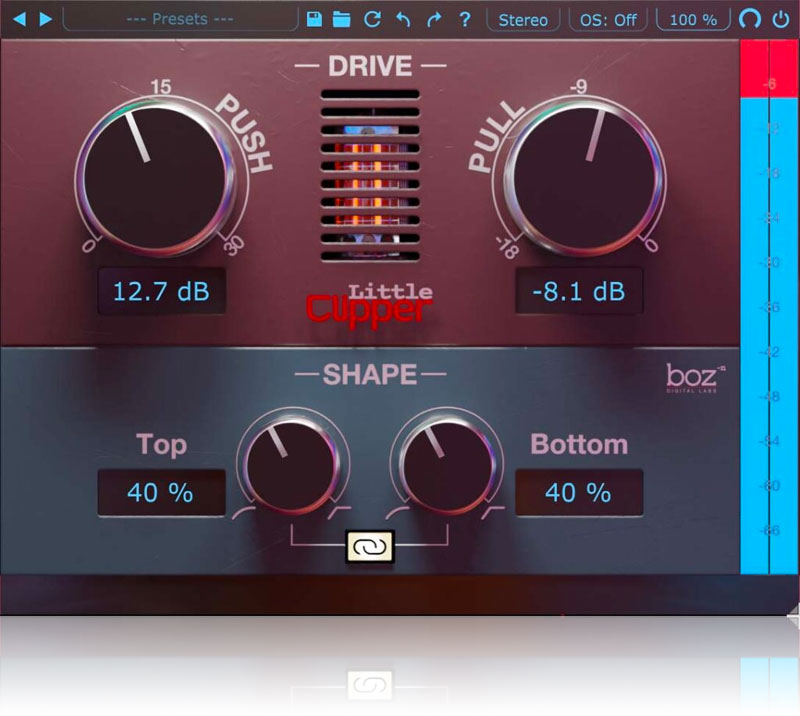
Little Clipper 2 has the essential features needed to quickly and easily dial in the perfect amount of clipping. “Push” controls the input gain of the clipping algorithm. The harder you drive the input, the harder the clipping. The “Pull” knob adjusts the clipping threshold. Anything above the threshold is clipped, anything below is untouched. A Hard/Soft slider lets you shape the clipping from soft and smooth to bright with bite. Between the Push and Pull knobs are meters that show you input level and threshold. Levels are displayed in blue, while the amount of clipping is shown above the input level in red.
Stereo or Mid/Side
Little Clipper 2 lets you choose your channel configuration for stereo tracks. Clipping often sounds much more natural in Mid/Side mode on stereo buses. It even lets you clip only the mid, which is good for mono tracks, such as bass, kick drum, and snare), or side channels only, giving you even more control over clipping.
Applications
Just like all effects, clipping is bad when you do it haphazardly. When used with purposeful intent, it’s a very powerful tool that can increase apparent dynamics while keeping peaks under control. It’s especially powerful on drums. Just a little bit of clipping before a compressor on a snare drum will give your compressor much more natural sounding, predictable results. Or say you have a snare performance with ghost notes that you’d like to bring out for groove purposes. You could use a multi-band expander, but then you run the risk of emphasizing “singing” toms (toms ringing on in sympathy with the kit). Little Clipper 2, on the other hand, will bring up the ghost notes without the tom song. And speaking of toms, nothing gives them more attitude without amplitude than a Little Clipper 2. Just add a touch of push and toms come forward. Use it on a drum sub-mix in M-S mode, and hear the drums take on a three-dimensional quality, thanks to its enhancing effects on ambience.
Available Formats
Mac: MacOS 10.13 or greater (Intel and Apple Silicon)
Windows: 7 or greater
64-bit VST2.4, VST3, AU, AAX